|
Export Directional Survey(s) To
|
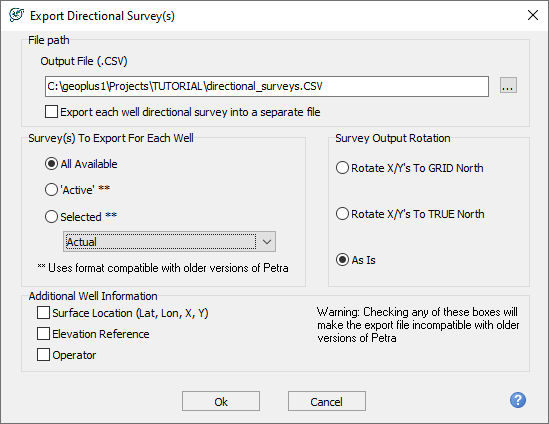
This entry sets the name and location of the exported file. Select the Browse button to navigate to the desired directory and to select the file name.
|
|
Survey(s) To Export
|
Petra can store multiple directional surveys (both real and planned) for any well. This tool can export any or all of the directional surveys for all wells. This section sets which specific surveys to the file.
- All Available— include all surveys loaded in the project, including all active and secondary surveys.
- 'Active'— export only the active surveys.
- Selected—export only surveys with the survey definition selected on the dropdown list, typically Actual or Proposed.
|
|
Survey Rotation Option For Survey Option
|
This tool controls how Petra applies the convergence correction to the exported directional survey data.
- Rotate Output Survey to GRID North— export the surveys relative to the grid north. Grid north surveys are dependent on the map projection, and will only project correctly on maps with the same reference datum and coordinate system.
- Rotate Output Survey to TRUE North— export the surveys relative to the true north. These will not plot correctly on a map unless the convergence correction is reprojected.
- Output Survey Data As Is— ignore the convergence correction andexport the surveys "as is."
|
|
Additional Well Information
|
Provides additional directional survey export information.
-
Surface Location—Lat/Lon, X,Y coordinates
-
Elevation Reference—Surface, Landing, and Bottom Hole
-
Operator—Operator (Well tab)
These data items are only compatible with Petra 2021 or later.
|