
Import AccuMap Data into Petra using a well list |
|
Export data from AccuMap into Petra using an automated process that prompts you for AccuMap export details, launches Petra, and then prompts you for Petra import details. The spatial extents of the data are defined by the bounding wells in the list. Data includes well, production, grid, culture, Open Layers, and shapefile data in NAD83 or NAD27 format. Export functionality is available in AccuMap using either the Detail Map menu, or Well List Manager. Petra creates new projects by default in the directory specified in the registry. To specify a different location, add the following to the Petra.ini file found in the Petra installation location (either on the server for a network setup, or on the local machine for a standalone setup): [ACCUMAP]
PRIVATE_PATH=c:\Geoplus1\Projects
PUBLIC_PATH=c:\Geoplus1\Projects
To import AccuMap data into Petra using a well list
Petra automatically launches and begins importing AccuMap data. Petra displays import statistics and then prompts you to load the AccuMap data.
The Import Petra AccuMap File dialog box appears.
Generally the default options are appropriate; however, click below for a description of the various options on each tab:
The AccuMap Petra Production Import dialog box appears.
The Petra Main Module appears when the data finishes loading.
The Import Cartographic Data dialog box appears.
If culture was included in the original AccuMap export, the Import Cartographic Data dialog box appears a second time with AccuMap Culture File (CDF) displayed in the File Type drop-down list on the File tab and additional tabs to review.
|
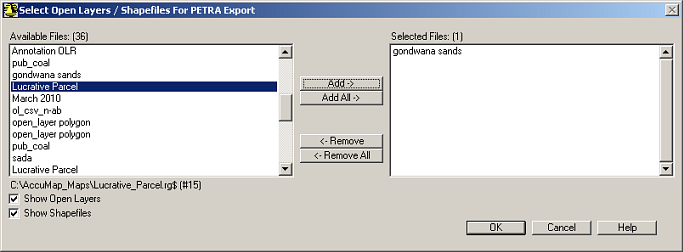
 ), and click