
Log Maintenance
The Log Maintenance Tool creates, deletes, and renames log definitions. This tool can also change the default log scales and lock/unlock a curve for the entire database.
To open the Log Maintenance tool:
-
Click the Maintenance button
 on the Main modules Logs tab
 -
Main: Logs > Definitions and Maintenance...
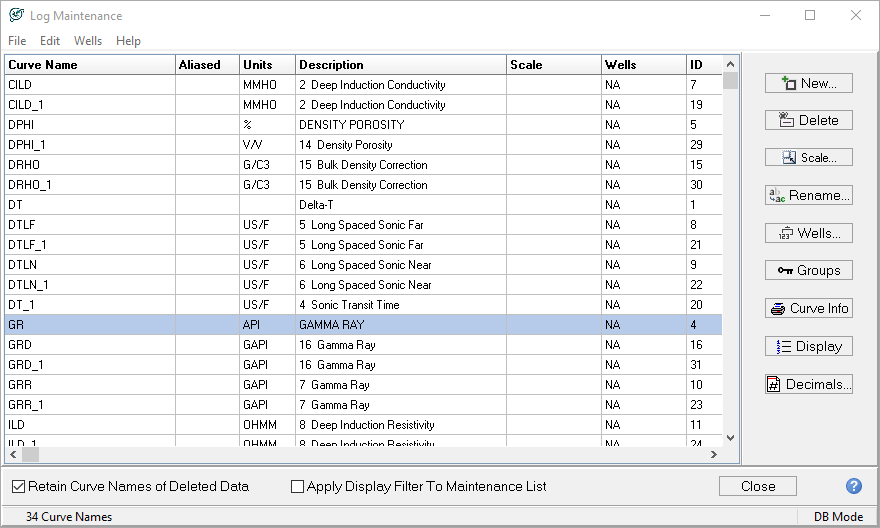
|
New... |
Creates a new log definition Note that the new definition will have no log data (0 wells) associated with the new log definition. Generally, this option is best for renaming a log trace to a new name. After creating the new log definition, use the Logs tab's "Rename..." option to change the log to the new name. |
|
Delete... |
Deletes the log definition and all associated data for all wells in the database |
|
Scale... |
Sets the default scale for the log |
|
Rename... |
Changes the name and descriptive text for a log definition. |
|
Wells... |
Opens the Wells List containing the selected log(s). |
|
Groups |
Globally locks or unlocks the selected log definition |
|
Curve Info |
Prints the curve information on this screen |
|
Display |
Opens the Filter Log Curve Names tool. When the curves are in the "Filtered Curve List" on the right side of the screen, only those selected curves will display in Petra. Only curves on the Filtered Curve List will show up elsewhere in Petra. |
|
Decimals |
Provides the option to specify the number of decimal places for selected logs. Select a row or rows, click Decimals, and enter the number of decimals you want for the selected items from 0 to 8. The upper and lower depth bounds are updated as well as the values in the log table. |
|
Retain Curve Names of Deleted Data |
When a curve is deleted, the curve name remains in the list. |
|
Apply Display Filter to Maintenance List |
Applies the filter established in the "Filter Log Curve Names" tool on the Maintenance List. |