|
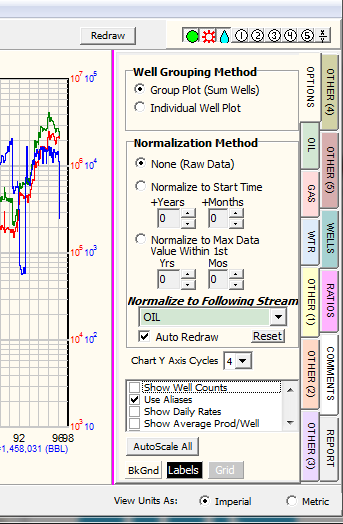
The Options tab establishes which averaging and time-normalization, if any, will be applied to the data.
|
Well Grouping Method
|
·Group Plot (Sum Wells) This sums the selected wells' production streams together. This data can either be shown as a cumulative or an average plot.
·Individual Well Plot This plots the individual production streams for each selected well.
|
|
Normalization Method
|
There are 3 methods on Normalization:
-
None (Raw Data) — no normalization. The streams are graphed at their actual start/end dates and are not adjusted to a single starting time. Production is plotted on the Y axis against calendar year along the X axis. Raw data plotted against cumulative values shows historical production for the selected wells.
-
Normalize to Start Time — the specified +Years becomes the 0 point on the plot x axis. Production streams record production for a well each calendar month. Time-normalizing this data adjusts all the production streams back to a single starting point. This helps to eliminate partial month production or spurious data at the beginning of a well's production stream. For example, setting this option to 2 months will set the start time for every well (0 on the X axis) after the first two months of production. A time-normalized plot shows production on the Y axis against the elapsed time along the X axis. Average production plotted against elapsed time after a single starting point gives an average well or type curve production. The cumulative values on the bottom of the production plot do not include the data truncated by time normalization, and reflect only the sum of the data after the normalized start time.
When production is time-normalized and averaged, the plot illustrates average well or type curve production for the selected wells.
-
Normalized to Start Time — adjusts each well's production to a single starting point a set number of months and years after the beginning of production. This helps to eliminate partial month production or spurious data at the beginning of a well's production stream. For example, setting this option to 2 months will set the start time for every well (0 on the X axis) after the first two months of production. A time-normalized plot shows production on the Y axis against the elapsed time along the X axis. Average production plotted against elapsed time after a single starting point gives an average well or type curve production. The cumulative values on the bottom of the production plot do not include the data truncated by time normalization, and reflect only the sum of the data after the normalized start time.
·
·Normalize to Max Data Value Within 1st Adjusts all production to a starting time at the maximum value of a selected production stream within a time frame. This is useful to time-normalize wells that take a variable amount of time to reach full production. As an example, if this option is selected with maximum OIL production in one year, Petra will find the month with maximum oil production within the first year and set that as the start time (0 on the X axis). Average production plotted against elapsed time after a single starting point gives an average well or type curve production. The cumulative production values at the bottom of the screen do not include the data truncated by the normalization, and reflect only the data after the maximum value.
·Auto Redraw This option automatically redraws the plot whenever any change is made. If this option is deselected, the manual redraw button is located on the upper right side of the screen.
|
|
Chart Axis Cycles
|
Sets the number of logarithmic orders of magnitude shown on the plot. The default is 3.
|
|
Show Well Counts
|
Enables well count graphs to be plotted at the top of the screen. This graph shows the number of wells with production data for each month. Each production stream has its own well count, which is turned on under the Plot Well Counts check box under each production stream tab. When looking at averaged data, this plot helps to show how many wells are being used to calculate average production at any given month. Non-producing wells (those with null values) are not factored into averages. Well counts can also be useful to show the number of producing wells in a field when looking at historical cumulative data.
|
|
Use Aliases
|
|
|
Show Daily Rates
|
Converts monthly production rates into an average daily production rate
|
|
Show Avg Prod/Well
|
This option divides cumulative production based on the number of producing (non-null) wells. In other words, if a well has a null for a month, it is not used in calculating an average production for that month.
|
|
Draw Through Null Values
|
This option draws a straight line between null production values.
|
|
Suppress Yearly Cums in Report
|
When creating a text file as a data report under the REPORT TAB, Petra normally also includes cumulative values for the end of each year. When this box is checked, the cumulative values are left off the report in order to ease the production data's import into other applications. For more information, see REPORT TAB.
|
|
AutoScale All
|
Selecting this option sets all Production to AutoScale. Using this option retains any user-set YMax settings for each tab (see below).
|
|
BkGnd, Labels, Grid
|
These options set the colors for the background, X axis labels, and logarithmic grids. By default these are white, black, and grey.
|
|