Production Normalization Wells tab |
|
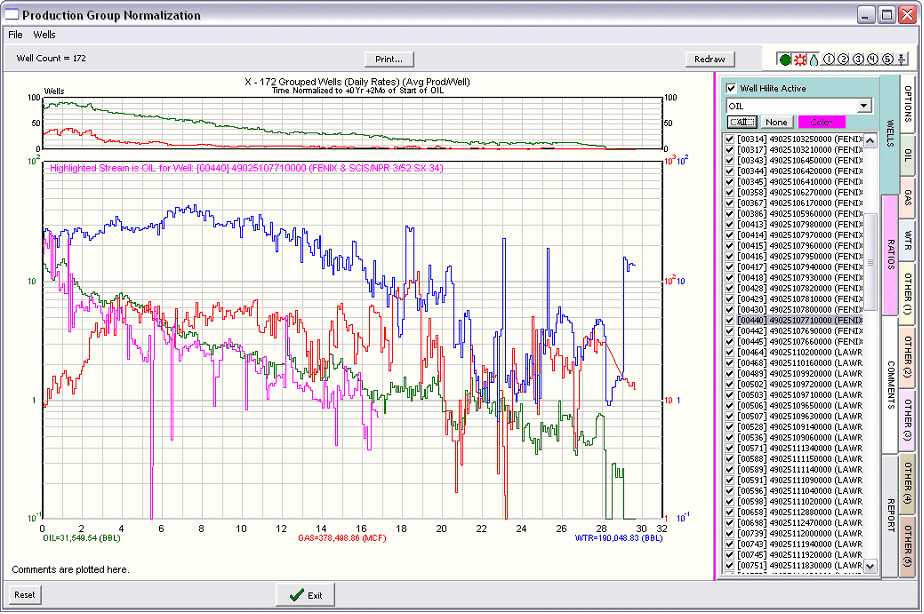
Once wells are selected in the group production tool, it's also possible to individually turn wells on and off from the WELLS tab. Turning a well off removes its contribution to the cumulative or average production. The checked box to the left of each well signifies that the well is used in cumulative or average data shown on the main plot. Un-checking the box temporarily removes the well from both plots and calculations. The Check All and None buttons respectively select and deselect all wells in the Production Group Normalization Tool.
Well Hilite Active This shows an individual well's production stream relative to the aggregate data. Clicking on a well name causes the individual well's production to be shown on the main plot. The drop down menu selects the individual production stream to display, while the color box selects the display color. In the example above, the plot is showing the individual well's oil production stream in pink relative to the time normalized average oil production for the field. Highlighting a well also shows its WSN, UWI, and well Label on the top of the plot in the selected color. |